|
DX Monitor Beta PageBeta test versions of DX Monitor may be used for up to 30 days from their release date and will run even if your trial period has expired. If you tried an earlier version of the program and decided not to purchase this is your chance to try it again for free.
BETA VERSION is for those wishing to test only If you do not want to try the beta version, you can download the latest release version of DX Monitor (1.77). Notes to beta testers This is a beta test version of the software. It may have bugs in it. I recommend that you install it in a different folder from the release version you use daily.
Watch this page or the Groups.io Mailing list for announcements. The beta test version incorporates new features or changes which may not have been extensively tested, or may have incomplete documentation. If you find bugs or errors in the documentation, please report them to the author. This version should be installed in a new folder. You can read your serial number from the old program by pressing F10 and looking at the User Information tab. If you install over an old version, backup the folder before installing in case there is a problem. Read the manual for the beta version. Frequently asked questionsHow do I use my old alerts with the new program? You can save your alerts file by name in the Alerts window - File - Save As.... Normally, this allows you to have multiple alerts files for different purposes. The saved file can be loaded into the new version of the program with File - Open.... If you didn't save a named file with your alerts, you will find your old alerts in the folder .../alerts/default.txt where you backed up DX Monitor with your usual backups. How do I use my old settings with the new program? You can save your profile by name in the Main window - File - Save Profile.... Normally, this allows you to have multiple profiles for different purposes. The saved ini file can be loaded into the new version of the program with File - Use Profile.... If you didn't save a profile, you can copy your old dxmon.ini file into the new folder. However, this can be a problem if the new ini file contains new URLs as you will replace them with the old URL, so it is not generally recommended without paying close attention. The ini file is a standard text file. Users with sufficient skills may edit the ini file manually to combine settings from before with new settings. Usually, changed URLs are mentioned in the version change information below. How do I use my old filters and colors with the new program? The filters and color choices are in the data folder below the folder in which you have installed DX Monitor (C:\Program Files (x86)\DX Monitor 177\data for example). Search for the dxmon.exe executable if you are having trouble finding it or check the Properties of your shortcut. You can copy the *.fil files to the data folder of your new installation. You should always back up your DX Monitor installation including the data folder to a different folder or disk drive so that you can revert to older files if you need to. Custom filters should have custom names so that they are never overwritten by an update.
Changes and additions in the latest release:
Version 1.90 November 30, 2021
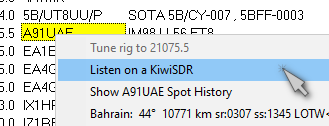
Added Listen on a KiwiSDR to the Band Map popup menu. Version 1.89 November 15, 2021
Added Listen on a KiwiSDR to the popup menu. Version 1.84 Minor bug fix in Save Profiles... Version 1.83
Added more Telnet addresses to Telnet Server list (mostly CW Skimmers) Version 1.82
added Copy call to clipboard in main and band windows - HB9CQV request Version 1.81
Saved profiles now include preferences and the alert list. Version 1.80
Fixed parsing of NOAA K-index due to changes in format from NOAA Version 1.79
Added autostart Telnet window when Telnet Option Connect On Startup is checked Version 1.78 Check for NOAA WWV information in the first 2 minutes of operation instead of waiting for 6 minutes Version 1.77
Added shortcut keys to BandMap band buttons. Alt-2 for 20 meters, for example. (Thank HB9CQV for the suggestion). Version 1.76 Fixed performance issues with very large Alert Lists on some computers. Version 1.75 Added IBP Beacon Tracking to the maps. The radio controlled by DX Monitor will tune to the selected beacon as it changes bands. Version 1.74 Performance enhancement on special DX Summit History downloads. Version 1.73 Release version of 1.72 Version 1.72
Fixed WWV and NOAA URLs because NOAA redesigned their web site. Version 1.71
Fixed DX Summit search button in History window to work with new site design. Version 1.70
Added auto-import after converting DX Summit CSV file Version 1.69
Added Convert DX Summit CSV file to History Window Version 1.68
Fixed Band Window sizing in Windows 7 Version 1.67 LID filter extended to hot DX and twitter output Version 1.66
Minor changes to twitter window Version 1.65
Improved Twitter interface to allow custom #hashtags Version 1.64
Fixed parsing of data with <> symbols in the comment field appearing as junk spots Version 1.63
Fixed bug parsing FK8C callsigns as Chesterfield Islands Version 1.62
Updating over an old version now resets URLs to default values, even if user retains his settings Version 1.61
Updates to the manual incorporating the new features Version 1.60
Canadian provinces added to location display if K4HAV database is present Version 1.59
Additional mapping of stations that have located themselves on the VE3SUN Ham Locator Map Version 1.58
Import of DXALARMS.TXT from the Alert List of older versions of DX Monitor Version 1.57
DXCC Countries list corrected in the Alert List pulldown menu Version 1.55
Major improvements to Alerts List - supports multiple alert lists, import ADIF logs, alerts by band/mode Version 1.54
Twitter interface updated to the new OAuth API (required after Version 1.53
More accurate station locations for mapping on Google Earth. Version 1.52
Updated URLs for QRZ and WWV data. Version 1.51
Fixed parsing of DX Summit DX Spots for new format.
Version 1.49
Fix for spotting bug at DX Summit that multiplies spots with 2 decimal places by 100. Version 1.44
Miscellaneous minor bug fixes and adjustments. Version 1.43
Improved Vista Compatibility. Version 1.42
More Twitter features added. Version 1.41
Alerts by band and mode for countries. Version 1.40
Twitter Window added with tweeting of Alerts, comments, and Hot Spots. Version 1.39
Fixed problem handling of K5D.. calls due to revised CTY.DAT format Version 1.38 DX Summit parsing changed to incorporate changes in the site format (again). Version 1.37 DX Summit parsing changed to incorporate changes in the site page format. Version 1.36 DX Summit URLs changed for Announcements. Version 1.35 Fixed DX Summit URL for 25 spots, which changed again Version 1.34
Added customizable background color on selected items in main window.
Version 1.33
Fixed bug relating Spot button with Telnet connection. Version 1.32
Revision of DX Summit URLs. Version 1.31
Display country for non-US calls when state is shown for location. Version 1.30 Switch to new DX Summit web site. Version 1.24
Bug fixes in file conversions. Version 1.23
Updated WWV Graphics to include Cycle 24. Version 1.22 Added LID filter to the right click menu and Main Window Options to block spots from or about selected callsigns. Version 1.21 Added the ability to import data from the DX Summit Database. Version 1.20 Fixed problem importing lists of callsigns to the History Window Version 1.19
Major update of Help Files. Version 1.18
Added HamCap to the Windows menu of the Main Window. Version 1.17 Fixed rig control bug affecting European computers with commas in numbers. Version 1.16
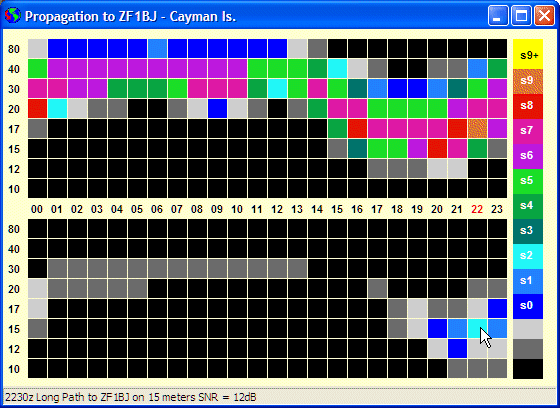
Added Propagation Chart to show predicted propagation to the DX station.
Version 1.15
Right click map to add custom station location.
Version 1.14
Fixed bug relating to 1A4A not displaying country information and beam headings.
Version 1.13
Propagation Prediction has been integrated into the Band Map and the Main Window.
Version 1.12
Propagation Prediction has been integrated into the Band Map.
Version 1.11
Fixed URL for CTY.DAT as changed on August 19, 2006.
Version 1.10 Support for the OmniRig rig control engine. DX Monitor will optionally install OmniRig during the installation process. OmniRig allows DX Monitor to control the frequency of your radio from the main grid or the band map using the mouse or the popup menu. The Google Earth screensaver will also control the radio receiver frequency, so the rig will scan as the satellite images are displayed.
Version 1.09 Support for the HamCall CD and Internet Callsign Server to provide data for the Station Information Window. Double click on a URL or email address in the Station Information Window to go directly to the home page (or email) of the DX station.
Version 1.08. Addition of a LOTW user list which is used to display LOTW in the station information. For now, it is necessary to click on a callsign to see the LOTW status. If you would like to see the status automatically displayed in the comment field, or by color, or some other way, please send me your suggestions. Addition of a Location display option of County + Country which displays the state and county for US stations and the country for other stations. Some changes to improve the efficiency of displaying location information in the Main Window when the FCC Database is used.
Hosted by BenLo Park |